

Digital Photography Basics
by mulberry
There are many of tips on how to get just the right photo. However, if you are starting out with a digital camera, there are basics you need to know before you take your first shot
Digital Photography: Just the Basics for Beginners
So you've finally joined the digital age with a new camera. You've decided that the ability to view and share your photos online would be fun. Or perhaps you just like the idea of being able to edit your photos or to print them at home. Either way, you're going to love this new experience and the photos you'll create.
There are of course a number of things you could learn or use that would be helpful. Many of those things however are really not much different than what you needed with a film camera. For instance, most of the basic photography skills needed in order to capture great photos are the same with a digital camera as they were with a film camera. You have to consider lighting, setting up the shot, focus, and so forth. In addition, some of the core equipment is the same too. Having a good camera bag to protect your equipment and a tripod to keep shots steady are still a good idea.
However, here I will cover some of the digital photography basics that you need to know before you even take your first shot. You need to understand a few key things that set digital photography apart from film photography. On this page, I will keep things easy and just focus on five things you need to learn or to have, to make your digital camera experience as enjoyable as possible.
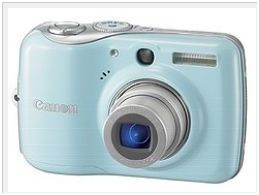 Photo by Raramaurina |
#1 Making Easy Connections
Digital cameras are prized for giving users the ability to download photos to their computer and from there to edit and share them. This is what truly separates digital photography apart from film photography and photo developing. Downloading is much easier.
Digital cameras come with the cables to connect to your computer for this process. It's a bit of a hassle to have to connect each time, and it does consume precious battery power.
On the other hand, if you have a newer computer, it may have a memory card slot which would allow you to simply insert the memory card and go.
If you opted for a more expensive WiFi enabled camera, you can perform this operation wirelessly. Of course a more expensive "Eye Fi" memory card can also do this.
However, if you don't have a computer with a memory card slot and you want to save money, purchasing a small, inexpensive memory card reader can make this task easy. These devices stay connected to your computer and allow you to simply insert the memory card and go.
 | Transcend P8 15-in-1 USB 2.0 Flash Memory Card Reader TS-RDP8W (White) With rounded edges and a streamlined design, the versatile P8 is compact (77.7mm x 46mm x 15.8mm) and easy to carry. Just plug the P8 directly into any USB2.0 port to ... Only $17.03 |
 | Delkin Devices Reader-38 18-in-1 USB 2.0 Flash Memory Card Reader Pocket high-speed USB 2.0 Reader / Writer 100% compatible with ALL card formats!. Includes removable cable! Only $39.99 |
 | Kingston 19-in-1 USB 2.0 Flash Memory Card Reader FCR-HS219/1 Kingston¿s new Media Reader moves files seamlessly from a digital device to your computer. It supports 19 card types, including SD, MMC and CF formats. With the self-contained ... Only $30.01 |
#2 Keeping Things Running
Digital cameras are well loved gadgets but there is one common complaint. They eat batteries. Having power when you need it and keeping costs down are another important digital photography basic that you need to understand before you even start.
Luckily some cameras come with a rechargeable battery. Many compact point and shoot modesl however, operate off of common AA batteries or something similar. This makes it easy to find the batteries and of course, they are significantly less expensive than a rechargeable Lithium Ion type.
When purchasing your new camera you will want to know what type of batteries it uses. With either type however, it's important to learn how to charge them and handle them properly to extend their life. For instance, don't expose them to extreme temperatures, don't drop them, and charge them only as scheduled. (Don't over or under charge) You can learn all about this by reading the manufacturer's instructions.
However, with a camera that may operate for less than 20 hours on a set of batteries, it's wise to opt for rechargeable batteries. You can easily find the chargers and batteries for as little as $15-$30 and they will last for years. This will keep your camera running when you need it and assure you don't exceed your budget as well. When going out with your camera, the most important thing to remember is to always take a charger along and a spare set of batteries.
 | Duracell Value Charger With 4AA Pre Charged Rechargeable Nimh Batteries, CEF14DX4 Duracell Value Charger with 4AA Pre-Charged Rechargeable NiMH Batteries - CEF14DX4 Only $28.92 |
 | Duracell Pre Charged Rechargeable Nimh Batteries Combo, one charger, 4 AA and 4 AAA batteries Ideal for digital and high drain devices, pre-charged and ready to use, straight out of pack. Retains power for up to 365 days while not in use, unlike regular rechargeagles. ... |
 | Sanyo Eneloop 4 Pack AA NiMH Pre-Charged Rechargable Batteries w/ Charger Once charged, eneloop keeps its charge even if you store it for 6 or 12 months without use / No more worries about the state of charge of your battery Only $29.95 |
 | Sony Cycle Energy Power Charger with 4 2500 mAh AA Batteries Sony's Cycle Energy High Power Charger and rechargeable batteries are ideal for high capacity, high drain devices and can charge up to 4 AA/AAA Cycle Energy Batteries. It ... Only $19.0 |
#3 Being Prepared for the Worst
Among the other digital photography basics that you need to learn, is the idea that this can be a dangerous endeavor. It is possible to lose all of your pictures. However, you need to remember that this was a potential problem with a film camera as well. Opening a film camera and accidentally exposing the film wasn't entirely uncommon. Many vacation memories were lost in this manner.
With a digital camera, the loss of the photos can happen early on (which we will discuss in a moment) or it can happen after the fact. Once your photos are downloaded to computer, most people tend to delete them from their memory card so that the card can then be used to store the next set of photos. However, if all you do is store photos on your computer, you are certainly putting those photos at risk.
If you think about it, it's logical. Hard drives crash sometimes, especially when your computer is used for getting on the internet where viruses live and thrive. Therefore, it's a good idea to consider digital photo backup. You can store a digital photo online with sites such as Flickr or Photo Bucket. You can also back them up on inexpensive disks or on an external hard drive. The important thing is to back them up in a place separate from your computer hard drive so that if it crashes, you will still have a digital copy of your photos.
 | Seagate FreeAgent GoFlex 500 GB USB 2.0 Ultra-Portable External Hard Drive STAA500100 (Black) Black 500GB Freeagent Goflex Ultra-Portable Drive Only $74.99 |
 | Western Digital WD Elements 320 GB USB 2.0 Portable External Hard Drive WDBAAR3200ABK-NESN ... Simply affordable, easily portable. Designed with the same commitment to quality that made WD external drives the number one selling drives in the world, Western Digital’s ... Only $73.01 |
 | Western Digital WD Elements 500 GB USB 2.0 Portable External Hard Drive Simply affordable, easily portable. Designed with the same commitment to quality that made WD external drives the number one selling drives in the world, Western Digital’s ... Only $103.15 |
 | Western Digital WD Elements 1 TB USB 2.0 Desktop External Hard Drive Designed with the same commitment to quality that made WD external drives the number one drives in the world, Western Digital’s WD Elements USB 2.0 external hard drives are ... Only $89.99 |
#4 Recovery
Memory cards seldom fail. But that doesn't always stop disaster. Sometimes through your own silly actions, you can lose the photos that are stored on a memory card before you manage to get them downloaded to your computer. You might accidentally delete them or something similar.
This is rare, but it can happen, and it can be devastating when it does.
When it happens, the important thing to know is that you shouldn't panic. If the photos were on your memory card when you last saw them, they are probably still there. When you delete photos (accidentally, or on purpose) the file isn't really gone in most cases until you record another photo or file on top of it.
So, first, remove the memory card and set it aside. Do NOT take any more photos using that card.
Next, find a photo recovery program that will in all likelihood restore them. The process is actually quick and simple. There are many paid programs out there that you can use. But, the good news is there are also a number of free ones that can sometimes do the trick.
I've personally used Recuva and found it to be successful.
#5 Embracing the Flexibility
This is the easiest of digital photography basics you will learn and the one that is the most fun.
Enjoying your digital photos is simple. After you download, you can play with them a bit to make them look just the way you want. Editing software is out there for you to buy, but many computers and certainly most digital cameras will come with basic programs to use. In fact, some websites will offer free basic editing programs. (Google Picasa is one).
Once they look the way you like, you can bring them up your screen, make them a screen saver, e-mail them to others, or use them on sites like Zazzle.com to create calendars, mugs, T-shirts, cards, mousepads, and more.
Of course digital photo frames are also a great option for enjoying those images. You can get them there via a memory card, wireless connection, and so forth. In fact, new wireless photo frames allow you to have photos delivered to your photo frame or the frames of family and friends automatically when you upload them to photo sharing sites.
Printing your photos is another option. This requires a photo printer, ink, and paper. Photo printing can take some time and a bit of expense, but is very convenient. Otherwise, you'll need to take your digital photos to a store or kiosk for printing. In all cases however, it is easier than developing film.
 | Toshiba DMF82XKU 8-Inch Wireless Digital Media Frame (Black) 8-Inch Digital Media Frame Only $39.99 |
 | Sony DPF-D80 8-Inch LCD Digital Photo Frame (Black) Get more entertainment from your photos with Sony’s DPF-D80 Digital Photo Frame. Store up to 500 1.5 MP images that you can display as single pictures, multiple thumbnails, or ... Only $58.95 |
 | Sony DPF-D72 7-Inch LCD WVGA 16:10 Photo Frame (Black) The Sony DPF-D72N/B 7" Digital Photo Frame is a display device that offers WVGA 800 x 480 resolution and will store up to 2000 images within its internal memory. Photos can be ... |
 | Kodak EasyShare P730 Digital Picture Frame Kodak EasyShare P730T Digital Frame with Traditional Frame Only $62.99 |
 | Canon Selphy CP780 Silver Compact Photo Printer Compact Photo Printer - Beautiful photos from room to room |
 | Canon PIXMA Pro9000 Mark II Inkjet Photo Printer (3295B002) High Performance Photo Printing up to 13-inchx19-inch for Professional Quality |
You might also like
Canon T3i Rebel Best Price EverI just bought the Canon T3i camera kit in an incredible package deal. If all ...
What to Consider when Buying a Digital CameraThe range and variation of cameras on the market today, can be overwhelming. ...

 About the Backlit Sensoron 05/07/2012
 Travel Steamer Buying Tipson 05/07/2012
 Yonanas Reviewon 04/20/2012
 Misting Fanon 11/28/2011

Comments
Very good article on Digital Basics. Well researched and written. A 'wealth' of information and placed in basic language so anyone reading can understand. Good job...
The photo recovery program is is a very useful tip. I hope I will never need it, but bookmarked it just in case.
Your article provides a great overview re: digital photography basics. Very useful - thanks, Christine! *