
I recently bought my partner a new Kindle - I was tired of him stealing my one! So before I wrapped it I decided that I'd transfer his books over to the new Kindle! One of the things that I think Amazon does very will with the Kindle, is making it really, really user friendly. Even the most technically illiterate should be able to manage. Here's how to transfer eBooks to the Kindle

How to Transfer Books From Kindle to Kindle
by Lissie
Whether you have a new Kindle and you want to transfer your existing books, or you want to share Kindle books with a friend - here the things you need to know!
How To Transfer Books From One Kindle To Another
The Easy Way: Register the new Kindle to the Same Amazon Account As the Old One.
You have unlimited different "devices" on one Amazon account. A device is any of the following:
- Kindles
- Kindle apps you've installed for any of your computers, laptops Mac, netbooks, iPhones, Android Phones and iPads.
Some book publishers do however limit how many devices you can have a book downloaded to (often a maximum of 5). If you hit this limit - just delete the book from some of your devices and reload. Self-published authors typically do not limit the number of devices you can download their book to.
Setting Up Your New Kindle With Your Amazon Account
You can do this two ways - if you bought the Kindle yourself - you can register your Kindle as you buy it - just answer yes to the "do you want to register this Kindle to your account".
If you didn't do this when you bought, so you partner doesn't know months in advance what he's getting for Christmas, or if the Kindle was a gift, you just register the Kindle the first time you turn it on. After you connect to your wireless connection, or immediately if you have a Kindle with 3G, you will be prompted to enter the email and password of your Amazon account.
I was expecting to then have to spend a few minutes going through and downloading "his" books to the new Kindle.
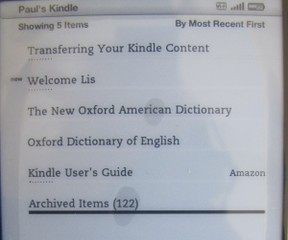 Nope, Kindle was ahead of me. Instead what it does - is after you've registered the Kindle to the same account as an old one: you will see an "Archived" Collection - click into that collection and you will see all the books currently bought from that Amazon account.
Click through to the Archive collection - and then click on any books that you want added to your new Kindle - it will download and show up in the main "Home" page. You can then add your own collection and rearrange your books as you wish. You can even download Collections from another Kindle on the same account - if you want the same layout.
How To Transfer Kindle Books from Computer to Kindle
Particularly for Books you Didn't buy from Amazon.
Amazon is not the only place you can buy Amazon books - I've listed some other options below:
Smashwords - Independent Publishers
Many books are free or cheap. For the price you get all formats available - so check that the book is available in Kindle (mobi) format before downloading
Project Gutenberg
Classic and out of copyright books - available free here. Don't pay for authors such as Dickens, Austin, Bronte - they are all free and available here
MobiPocket
Free and paid mobi format books - suitable for Kindles
The question is how to you get these books to your Kindle? Well almost certainly you already have the books downloaded to you computer - so its dead easy. Your Kindle would have come from a USB cable (or like me you have heaps of them lying around) - connect your Kindle to your PC and it will show up as just another directory (you Kindle will start charging too!). Using your computers Windows Explore or Mac equivalent - click into the documents directory on the Kindle drive - drag and drop any books you want into it.
You can use this method to not just download Kindle books (files which end in .azw, .azw1) But also any mobipocket book (unprotected) .mobi, .prc, plus text and pdf documents and audio files (.aa .aax .mp3)
Popular KIndle Accessories
 | GTMax Micro USB Data Hotsync & Charging Retractable Cable for Amazon Kindle 2 3 Brand new non-OEM. 2-In-1 Features: Hotsysnc & Charging. Retractable designed prevent tangled cable mess. Extend the cord with your desired length. Connect your Kindle with ... Only $17.23 |
 | Kindle US Power Adapter (Not included with Kindle or Kindle Touch) * The United States Kindle power adapter * Approved charger for Kindle, Kindle Touch, Kindle Keyboard, and Kindle DX * Fully charges Kindle, Kindle Touch, Kindle Keyboard, or ... Only $14.99 |
 | Marware Atlas Kindle and Kindle Touch Cover, Black The Marware Atlas Kindle Touch Folio Cover lets you travel the world with the peace of mind that your reader is fully protected. To keep your Kindle Touch safe from the wear ... Only $29.99 |
 | Decalgirl Kindle Skin - Winter Sparkle DecalGirl skins for Kindle feature distinct artwork printed in vibrant color onto premium adhesive-backed cast vinyl that is then sealed with a special sating/matte protective ... Only $16.99 |
 | Verso Clip-On Reading Light for Kindle (White) The Verso Clip Light attaches perfectly to your Kindle or Kindle cover. It casts an even pool of LED light without any “hot spots” that can accelerate eye fatigue. Reflection ... |
More Kindle Articles


Updated: 02/18/2012, Lissie
You might also like
Kindle Fire Accessories: Best Kindle Fire AccessoriesNow you own a hot Kindle Fire which are the best accessories to buy for it? C...
Kindle Unlimited: Is It Worth $120 a Year?This article discusses the value of various Kindle Deals (Daily Deals, Deals ...
Disclosure: This page generates income for authors based on affiliate relationships with our partners, including Amazon, Google and others.

 Build My Rank Alternativeson 03/22/2012
 How To Learn To Danceon 03/13/2012
 Low Calorie Gluten Free Chocolate Cake: Which Actually Tastes Goodon 03/12/2012
 Copyright and Recipes - How Does It Work?on 03/13/2012

Comments