Use Free Pictures at Pixabay to Create For Zazzle

by Dustytoes

Pixabay is an online site that offers high quality photos and clipart images that can be used as you please - even to sell in your Zazzle store.

Sometimes finding free, high quality and useful, public domain images to use on Zazzle products is difficult. I was accustomed to using my own photography only to sell at my Zazzle stores, but after a while, I found that I needed things I just didn't have.

It is easier to diversify when a variety of photography and graphic images are available to use for free! I am thrilled to have found Pixabay and I use the beautiful, high quality photography in many ways.

I mostly use Pixabay as my source for models (adults and children) to use as photo place holders on Zazzle's products, but there are other ways to turn Pixabay images into cash in your pocket.

(Surfer silhouette: Pixabay)

Put Your Imagination to Work

Pixabay is a good place to start if you have creative block.

Truthfully I am never at a loss for what to create for my Zazzle stores, but if you ever need some inspiration, just browse the pictures at Pixabay.

For instance I came across a group of photos by Nightowl that were taken someplace resembling the old west.  I used a few of them to make business cards for home renovations and have sold a few sets already.

Search at Pixabay and Download What You Need

They also link to sites that will charge money.

Pixabay has beautiful scenic photos and each time I visit the site, I find more and more beautiful images to choose from.  If making photo templates is not your thing, use any of the free images and create something else for your Zazzle store.

Each photo or graphic has a download offer and for Zazzle I choose the larger image size and then covert it to 300 dpi size that I need for the product(s) I will use it on.

** Make sure you only use the free images, as they include links to other professional images that must be purchased - unless you want to pay for your images.


"Free" Doesn't Mean Every Picture Can Be Used To Sell

Be careful when deciding which images you put up for sale.

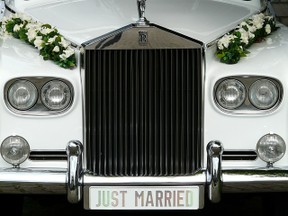
car used for weddingPlease remember that just because Pixabay says it's okay to use any photos for any purpose, there are guidelines to follow when selling any photos.

For instance, you shouldn't overstep the boundaries of legally using photos and some things such as vehicles, certain buildings, statues, bridges and other structures which may have copyrights which don't allow the general public to use them to make money.

Be careful when you are looking at any photos which contain items that were made by, or belong to, someone else.  I don't know all the rules concerning this, so if you are in doubt, do some research, or forget about using the picture.

Sunflowers and Blue Sky Country Wedding Invitation

This card was created using a combination of Pixabay images.

sunflowers and blue sky invitation

I love to combine elements from various images to create a totally unique design.

The floral photography at Pixabay is so beautiful that once the backgrounds are removed the flowers can be added to any type of design for any occasion.

Here I used the blue sky portion from one image and combined it with a sunflower border to make a country themed wedding invitation.

The sunflowers came from two individual photos and I removed the backgrounds, uploaded them side by side, and made a pretty border.

Tutorial For Removing the Background From Photos and Making A Text Template

Expand upon your creativeness.
I use a free software program to remove the background from my photos for use at Zazzle and this picture tutorial will show you how.
Make products easy for the customer to personalize by adding template text to them.

People / Models Used as Photo Holders

Real people make the photo holder product more interesting.

Pixabay's public domain images include some great shots of people (models) which can be used as photo holders for your photo template products at Zazzle.
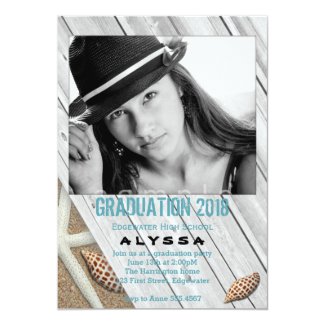
A photo card, custom mug, personalized Christmas ornament or anything you post for sale that has the option to add a personal picture will need a "photo holder" that will allow the customer to easily switch the example photo with one of their own.

Adding an interesting picture will make the item more appealing and will get more attention than an empty or boring holder. Subsequently it may be purchased more often.


Find Ms. Thumbs Up at PublicDomainPictures.

This Pretty Young Lady Draws Wanted Attention to My Products

Her image will be replaced the customer's own photo to personalize each item.
Ad Zazzle

Musical Instruments

Graphic images can look very realistic.

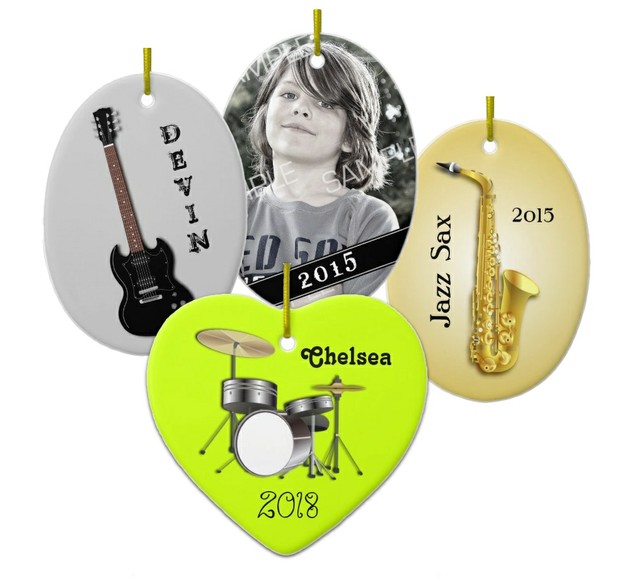
musical instruments ornamentsI needed musical instruments to create ornaments for my Holiday Store, so of course I searched Pixabay.  I found a collection made by Nemo and have added them to some products recently.  First I customized them in the graphics program to give them the look I wanted and added a new background.

Although I began with an image made by someone else, I have changed it and made it uniquely my own.  This is the way I like to use Pixabay images. 

I hope to sell these to customers searching for personalized ornaments with a music theme.

Cute Kids and Baby Pictures

Everybody loves a baby and your customers will too!

How To Use Pictures of Kids

Add them to birth announcements, birthday party invitations, ornaments and mugs.

Baby pictures and photos of children can be used on announcements, photo cards, gift mugs,  ornaments, and just about anything, as place holders in the template area.  It took me a while to understand how to make a photo template, but now I use them quite often on certain items.

Customers like to see what the product will look like with an actual picture where their child's photo will end up.  It's much more eye-catching than a blank, or uninteresting photo holder.  I can't know for sure, but I hope it makes the customer want to play around with the product and add their own pictures, and then, of course, buy it!

Don't Have a Zazzle Store?

I've written a page to help you get one up and running.
Everyone, who has art or photography to sell, can easily set up a basic online store at the Zazzle site.

Cuddled Up With Dad

This father and child picture makes a great photo holder.

Blue Snowflakes Family Christmas Photo Card This Christmas card has a photo template on the front for the purchaser to customize with their own family photo.

The template holder image with a father and child snuggled up and sleeping came from Pixabay. It's one of the sweetest photos, and the photo tells the buyer that this card is about the precious gift of family. It is perfect for personalized holiday cards about family love.

The Flower Selection is Amazing

The cherry blossoms used to make this card came from a Pixabay image.
Cherry Blossoms, Photo Mother's Day Card From Kids


Flowers are a common photography theme and Pixabay offers a lot of beautiful flower images. 

I've used the cherry blossoms image by Loggawiggler to create a few things like this Mother's Day card.  I cut away the background to make the blossoms stand out here.  Inside this card, I also used a Pixabay picture of some children as a photo holder.

Thank You Pixabay!

It can be very expensive to have to buy photos to use.

Generous and very talented photographers are constantly uploading quality photos to Pixabay so all you need is a little imagination to turn them into products in your store.

Personally, I don't think it would be right to just take someones picture and sell it, but there is no rule that says you can't.  It's just my way of thinking.  All photos are sitting there free to use, but I prefer to add my own touch to them in some way.

I've looked into buying photo holders at other sites and one picture alone can cost close to $100!  So I am very happy to find pictures and graphics to use at a free site.

Read More About Pixabay

This helpful page may answer any questions you have.
High-quality images, no royalties or attributions required, totally free for personal and commercial use. No sign-up necessary!

You might also like

My Zazzle Success Story

I've been selling products at the Zazzle.com site for five years now and my e...

If You Love to Draw, Show it Off at Zazzle and Make Some Money...

Artists have many choices of products to use for advertising and selling thei...

Copyright Free Images For Commercial Use

High-quality images, no royalties or attributions required, totally free for ...

Dustytoes, on 07/09/2012
 
Thank you! Would you like to post a comment now?
6

Have you used Pixabay as a source for selling products at Zazzle?


   Login
Dustytoes on 01/03/2013

Hollie- I'm so happy I could be of help. I want to see your store, so send me the link please. I hope the sales begin pouring in soon!!

HollieT on 01/02/2013

Hi Dustytoes, and Happy New year!

As I said I would, I've set up my Zazzle store today and ALL your Zazzle pages have been so much help. Thanks to you, I've discovered how to set up the store, remove background from images, discover where I can obtain free photos and even how to promote my store.

Thank you so much, you have no doubt saved me hours and hours of time and frustration. :)

Dustytoes on 11/19/2012

Hey rusty, I know what you mean. Pixabay is a great source of many types of people pictures.

rusty on 11/19/2012

Thank you for introducing Pixabay! I was thinking of creating photo cards but I've no idea where to get photos of people. My face is not pleasant enough to market the cards. Lol.

Dustytoes on 10/25/2012

I would not feel right selling something that had no part of me in it. Thanks Scott!

scott on 10/25/2012

Useful information. I think the most important idea of this article is "Although I began with an image made by someone else, I have changed it and made it uniquely my own." Yes, this will makes product different from original picture and to be suitable for product types. Thanks for this inspiring article.

EssentiallyArahs on 10/17/2012

Great article. Love it. Can't wait to look at Pixabay. SO excited. Glad to know I can use them as models to showcase stuff instead of trying to bribe my sisters lol.

RubyHelenRose on 08/23/2012

Oh cool, I am looking for more baby pictures, I gotta spend more time over there! Thanks for the great information about it. Your pictures are beautiful.

katiem2 on 08/23/2012

I'm using pixabay more and more, love the add on feature in the images edit module. Great user tips, thanks :)K

Dustytoes on 07/22/2012

Thanks for reading Swiss. Pixabay is constantly adding new images so keep looking if you don't find what you need. Their forum has a section where you can request an image too. You never know if someone might have a picture of what you need.


Disclosure: This page generates income for authors based on affiliate relationships with our partners, including Amazon, Google and others.
Loading ...
Error!