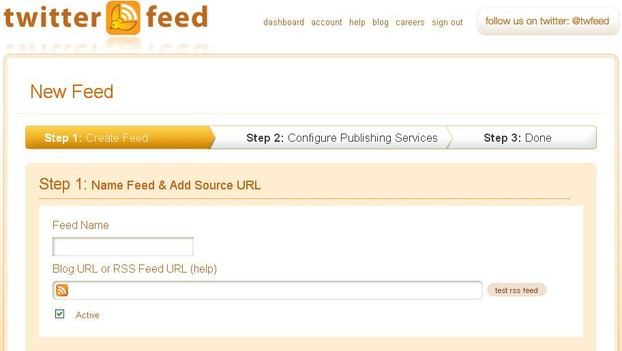
The first part of the process to add a new feed to Twitterfeed is standard and dead easy.
- Think of a name for the feed
It can be anything. It does not have to be the name the feed has internally, i.e. the <Title>. It could be 'qwgcbwd' for all Twitterfeed cares. But it must be unique for the set of feeds you may be entering. As this is the first feed you are entering it cannot other than be unique.
- Enter the Blog URL or RSS Feed URL
Panic!
Don't panic!
If you have your own blog or website, and have an RSS feed set up, then Twitterfeed can find it if you enter your site URL.
If you have an account at a free article site you can find your RSS feed by going to your profile page and clicking on that strange little orange button (as seen at the beginning of the Twitterfeed 'Blog URL.......' entry panel) that has RSS, Atom, or whatever next to it, or it may be a small oblong box with RSS inside it.
If you can't find it, go to the forum and ask 'a stupid question' or search for the answer to the question 'Where do I find my RSS feed?'.
Once you find it, click on it. Oh dear, what's all this code? Don't worry, it is just the feed being parsed. That is, checked that it works OK by your browser. All you are interested in is the URL that is displayed in the URL entry panel at the top of the screen. It will take many formats, different for each blog platform or article site, so I'm not going to give examples here. Just copy it to the clipboard (ctrl C will suffice). Now return to Twitterfeed and paste it into the entry section.
That is the entry phase complete.
Well almost. If you have followed the instructions above, the feed will be active, as it parsed OK. If, however, you are setting up this feed before you have made your RSS live, then uncheck the 'active' box.
Now, and always do this, test the RSS feed by clicking the 'test RSS feed' button. Why, because you will not always be setting up a feed exactly as above. It is better to know the feed works now, than find out later that you have wasted time expecting the feed to send tweets or whatever, and finding that it is not happening.
If it is OK then you will get a message saying:
 Feed parsed OK
otherwise, you may get:
 Your feed might be empty or missing publish dates or GUIDs. A feed needs to contain publish dates or GUIDs in order to work with twitterfeed, see help
In this case, first check that you have typed the URL correctly. Double check.
If it is correct, and it is your code, go and check the URL parses, by copying it to the URL entry bar at the top of the screen, and hitting the 'enter' key. This will return the code up to the point at which a failure occurs. Adjust the code and try again. Rinse and repeat.
If it is correct, and it is not your code, let the team at the place you got it from know. Wait for a good version to be returned.
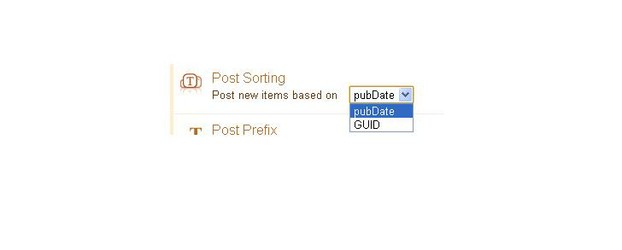
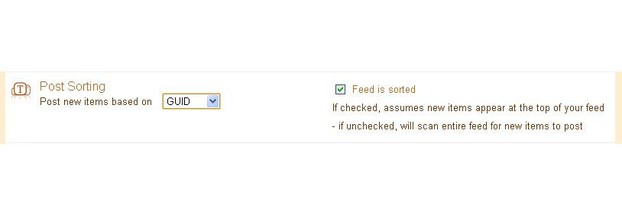
Note the words in the failure notice. It mentions 'publish dates' and 'GUIDs'. These are of use to you in the next section.
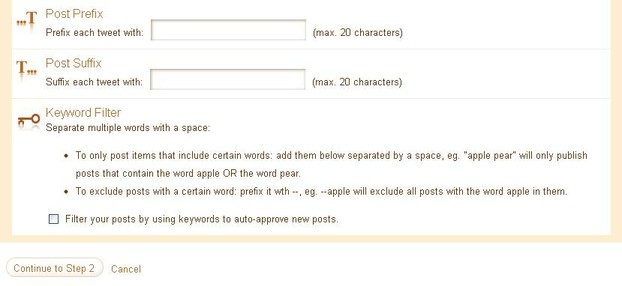
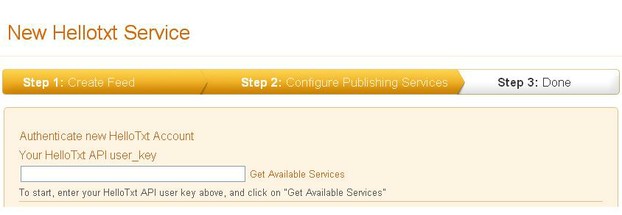
DO NOT PRESS 'Continue to Step 2' YET








 Gold Barson 10/19/2017
 Creating My Own Websiteon 02/04/2021
 Weights and Measures of Gold Barson 10/20/2017
 Types of Goldon 10/20/2017


Comments
Jo, thanks. A lot of sites have recently "hidden" their RSS feeds for one reason or another. When I get time I shall update here and try to put together a Wizz showing how to generate RSS feeds for the purpose of keeping your Twitter account active with relevant tweets. However, it may be some time before I do this as I am very busy currently.
The category feeds are all still there. You just need to have to work out what they are, as Wizzley doesn't provide them.
If anyone wants to work out their user specific feed for a certain category, message me. I might be able to guess the RSS URL with a bit of trial or error.
Great updates Chaz, thanks old man :)
My pleasure
I will have to come back to this article to understand it better and how to set it up correctly. Thanks for the details.
I'm afraid you have missed nothing. For Wizzley articles there is nothing that can be done (as far as I am aware). The # option comes into its own when articles are able to be grouped into categories (or sub-directories) in RSS feeds.
However, #'s are not as necessary as they once were - words without #'s attached are as likely to be grouped in twitter searches as # are - so don't fret too much.
I have followed all this so far and don't think it's too complicated. The only thing I'm stuck on is adding hastags. I know how to add them, but my articles are quite varied so certain hashtags are only relevant when tweeting certain articles. But there doesn't seem to be a way to separate the articles so that they different hastags for different articles (if that makes sense?) Is there a way and I've missed something Humagaia?
You need to reset regularly. The side effects are an increase in followers and an increase in the number of web properties that trawl the URLs you tweet - both being good effects.
Really good information! I never understood how to set up twitterfeed for some reason. Hope I get good results! :-)
This may not give you an immediate boost in income. You may get a few visits from Twitter users if you have a following. However, over time, this will increase your Twitter following, and more relevant will be the increwse in the number of sites that do actually visit, record your pages, and send traffic for the remainder of the time that each article is available for viewing.
BTW Sheri, just follow each step one at a time and the whole thing will fit into place.